Hello Neovim (and lua)v0.3.3
I wrote this using my new graphite layout at < 40wpm in extreme anger.
I had been using vim with an overly messy vimrc for more than 10 years. When the AI “revolution” started, I thought it was time to try the latest and greatest editors around. I tried cursor for a month, but a couple of things turned me off (this has probably changed since then). The AI features felt like they were lipsticked over vscode and the experience didn’t feel native to me. The other reason was I could not get the vim plugins do what I wanted them to. I kept reaching for the mouse repetitively. I switched to Zed and things felt better than cursor for a while, but I kept struggling with things like spellcheck and panel customization. I kept using it because they were constantly improving the product, but at one point I saw a youtube where someone was teaching how to use opencode. My curiosity pushed me to download neovim to follow along with the youtube and it was then that I realized how much better it is to be in vim than any of the editors that I had tried before. It gave me a sense of full control.
I decided to migrate my vimrc to init.lua as a first step, then go deeper by writing my own plugin to understand the neovim api.
The first thing that got my attention was how easy it was to work with lua. There was almost no friction in picking up the language with the exception of a couple of things. The first is having to explicitly declare vars as ‘local’ everywhere. If it wasn’t for the linter I would have missed that many times. The other was mixing 1-based indices with 0-based indices when moving between lua and legacy vim APIs. I spent a whole afternoon chasing a bug where a call expected a 0-based index, but that I passed a 1-based index value.
As this is my first plugin I was curious about how it got loaded by vim. What is Lazy.nvim doing to make it work? It turns out, loading a plugin is simple. All you had to do is tell nvim where it is through the runtimepath variable. To test this run :OnMyTermToggle after running the following commands:
git clone [email protected]:nkabbara/onmyterm.nvim.git
cd onmyterm
vim --clean --cmd "set rtp+=$(pwd)"
Adding the plugin dir to runtimepath enables require() to find it. It reads many directories within that path including lua, plugin, and doc (see help runtimepath). Lazy does much more and adds a lot of features to fully manage you plugins, but at its essence, we are just telling nvim where things are. Entry points into the plugin could be achieved with nvim.api.nvim_create_user_command or vim.keymap.set. From there on the work is very specific to what it is you are trying to do.
The lua neovim API was confusing in the beginning. You have methods like vim.*, vim.api, vim.cmd.*, vim.fn.*, vim.opt.*, and vim.o.*. Why is the API surface divided this way? What I understood from reading the docs is that anything that has to do with vim (from which nvim was forked) goes under vim.cmd for ex-commands and vim.fn for builtin functions and user functions. So it’s in these functions that we have to use 0-based indexing even if lua is 1-based. Any functionality that has to do with GUIs or remote plugins goes under vim.api. And vim.* contains everything else including the lua stdlib. Things get conflated when the same function is implemented under multiple APIs. This is usually done for various reasons, mostly convenience. lua-guide is a must read.
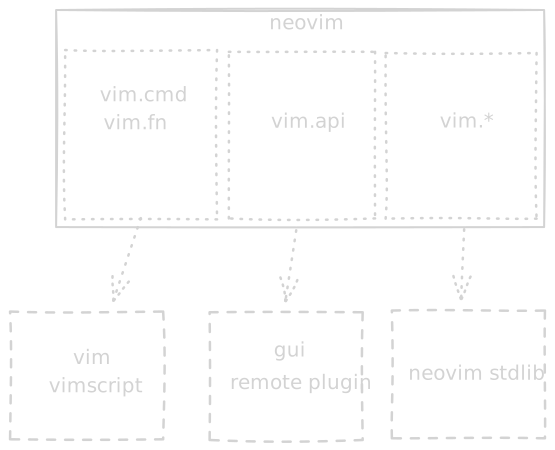
Next up is exploring new areas in userland that I had neglected in the past. I’ll keep updating this document as I learn new things.
Userland
Buffer Motions
- word & WORD:
w,b,eandgehave capital counterparts that act on WORDS. These count things like'as part of the word. g<up arrow>,, etc... count wrapped lines as actual lines. I might remap those to arrows as their `g` counterparts to line-wise.
Ex Commands
I always had a feeling that I am underutilizing command mode and I’m constantly annoyed at the limited mobility and editing ability. It turns out there’s tons of power there:
C-wdelete word backC-fswitch to an editable buffer. Edit any command in there and hit enter to execute.